
Latest Version
libvibrant Team
Health
Linux
Free
io.github.libvibrant.vibrantLinux
Report a Problem
More About vibrantLinux
If you have ever wanted to make your screen colors pop while gaming or watching videos on your Linux setup, vibrantLinux color saturation adjustment is the exact utility you need.
For years, Windows users have enjoyed tools like VibranceGUI to dynamically boost color vibrance when specific applications launch. The libvibrant Team has brought this exact convenience to the Linux ecosystem, allowing users to automate display saturation based on what window is currently in focus.
Automated Color Profiles for Your Desktop
The core strength of the vibrantLinux color saturation adjustment tool lies in its automation. Instead of manually tweaking your monitor settings every time you launch a game or a media player, this utility monitors your active windows. When a targeted program gains focus, the tool instantly applies your pre-configured saturation level. Once you switch back to your desktop or another application, your screen returns to its standard color profile.
Key Features of vibrantLinux
- Per-Application Profiles: Define custom saturation levels for individual games, web browsers, or video players.
- Seamless X11 Integration: Specifically engineered to work reliably on systems running the X11 display server.
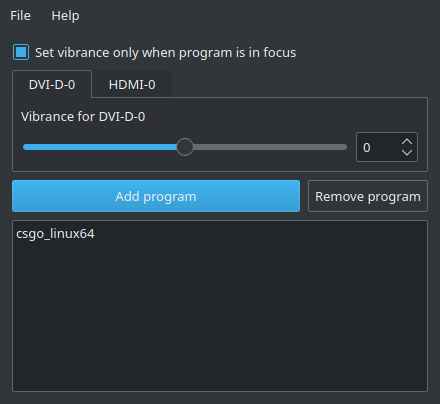
- Intuitive Graphical Interface: A clean, straightforward GUI that makes adding programs and adjusting sliders incredibly easy.
- Resource-Light Operation: Runs quietly in the background without impacting system performance or frame rates.
Who Is This Display Utility For?
This utility is primarily built for Linux gamers who want better visual clarity and target tracking in competitive titles, as well as multimedia enthusiasts who prefer a more vivid visual experience. If your current display looks washed out or lacks depth, configuring vibrantLinux color saturation adjustment can breathe new life into your existing monitor without requiring hardware upgrades.
Getting Started with vibrantLinux
Because it targets the X11 windowing system, setup is highly straightforward on compatible Linux distributions. Once configured, you can set it to launch on system startup, ensuring your custom color profiles are always ready when you are. If you are ready to enhance your desktop visuals, we highly recommend visiting the official Flathub page to explore the utility further and integrate it into your system.
To learn more or to set up this application on your system, head over to the official vibrantLinux Flathub page to get started.
Rate the App
User Reviews










Popular Apps










Editor's Choice